


OohYeah - Video Chat & Call
4.160.00 Reviews
App Specs
- Version
- 1.0.22
- Updated On
- License
- Free
- Downloads
- 100,000+
- Developer
- VIVI LIMITED
- Categories
- Social
- Platform
- Android
Screenshots
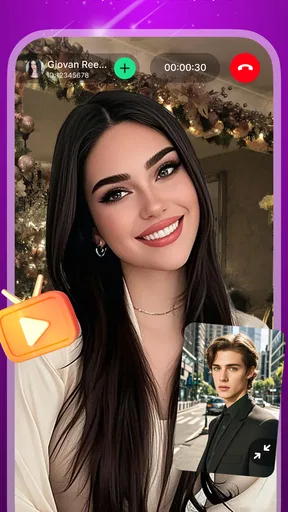
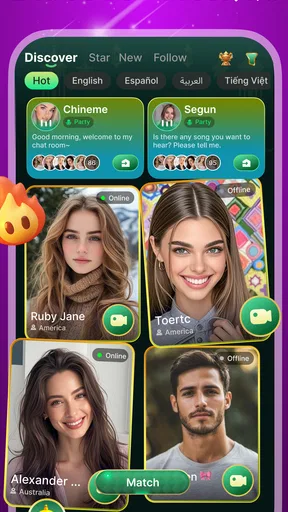
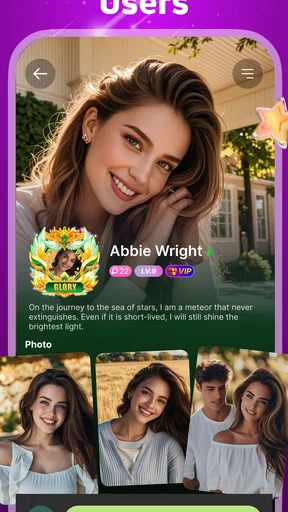
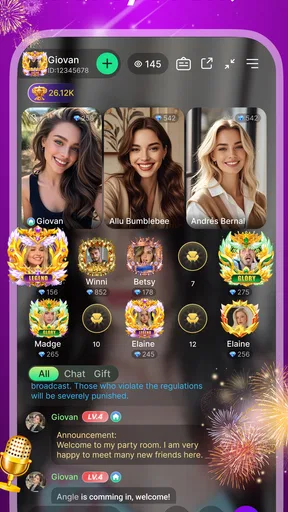
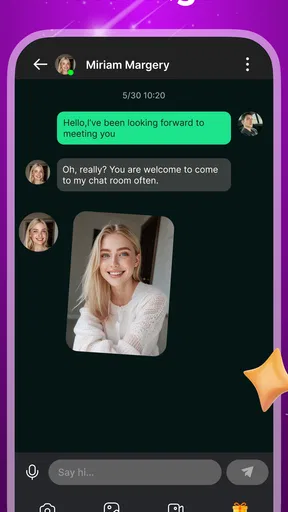
 Analysis by AppCompare
I approached OohYeah as a social app for spontaneous video conversations rather than as a replacement for every messaging service on my phone. Its central idea is simple: connect with people around the world through video chat and calls. That simplicity is appealing, especially when I want a more human interaction than typing, but it also means the quality of the experience depends heavily on how comfortable I am with unfamiliar conversations, visible camera use, and the app’s mature audience.
After using it, my main impression is that OohYeah is easiest to understand when treated as a casual discovery tool. It is not the app I would choose for a carefully organized group project, a dependable appointment, or a private conversation with close friends. I see more value in it for someone who enjoys meeting new people, has patience for unpredictable interactions, and wants a lightweight way to explore conversations beyond their usual social circle.
How OohYeah feels to navigate and read
I find the easiest way to judge OohYeah’s lasting value is to look beyond the novelty of a first video conversation. This section considers how its focused layout shapes those early sessions, and why a little preparation can make the experience feel more manageable.
A straightforward concept with an important learning curve
The developer, VIVI LIMITED, presents OohYeah as a free social app, and the basic purpose is clear quickly. The service is built around video chat with people worldwide, so I never had to spend much time figuring out what kind of activity it was meant to support. That clarity matters for people who dislike complicated social platforms filled with feeds, channels, badges, and several competing ways to communicate.
At the same time, a simple purpose does not automatically make every moment easy. Video-based social apps ask me to make decisions quickly: whether I want to appear on camera, whether I am ready to speak, whether a conversation feels comfortable, and whether I want to continue or leave. For a user who prefers to read instructions slowly, those choices can feel more demanding than sending a message in a conventional chat app.
I found that the best way to approach the app is to decide my boundaries before starting a session. I would choose a quiet place, check the camera framing, and keep in mind that an unexpected call is not something I have to accept. That small preparation makes the interface feel less stressful because I am not making every decision under pressure.
Readable enough for short sessions, less ideal for relaxed browsing
OohYeah suits people who want direct interaction rather than long periods of reading. The social purpose is visual and conversational, so the app’s usefulness does not depend on scanning large amounts of text. That can be a benefit for someone who finds text-heavy social networks tiring or confusing.
Worth Reading Before You Choose

EA SPORTS FC Mobile 26 Is a Bigger Football Game, but It Takes Time

Flipboard Shows What News Apps Must Do Beyond the Feed

Switching to Android Auto Means Rethinking Your Driving Routine

Google Calendar Makes a Crowded Week Easier to Manage

Ludo King Makes the Most of the Minutes Between Plans

Baby Panda World Brings Quick Play to Modern Phones, but Its Game Library Feels Busy
However, video chat also shifts attention away from written information. If I need to understand who I am meeting, what a conversation involves, or how a particular action works, I may not have as much time to process it as I would in a traditional messaging app. I recommend pausing before joining anything unfamiliar and checking the available controls rather than assuming that every screen behaves like a standard phone call.
For readers who rely on larger text, strong contrast, screen magnification, or a slower pace, the practical question is not only whether the words are readable. It is whether the surrounding interaction leaves enough time to use those tools comfortably. OohYeah can be approachable when I use it deliberately, but it is less suitable when I need every social decision to be calm, predictable, and fully explained in advance.
What the mature rating changes
The mature 17+ rating is not a minor label I would ignore. It changes who I think should use the app and how carefully it should be introduced. A video conversation with an unknown person can move in an unexpected direction more quickly than a text exchange, and the camera adds personal exposure that ordinary messaging does not.
I would not recommend treating OohYeah as a child-friendly social space or handing it to a younger user simply because the download itself is free. Adults should also be realistic about privacy: a face, voice, room background, clothing, and daily routine can reveal more than intended during a short call. I keep the background neutral and avoid showing documents, screens, addresses, or other identifying details.
Using video chat with different abilities and situations
For me, whether a live social app earns a regular place depends on more than whether its basic idea is appealing. Here I look at the practical trade-offs for different communication needs and everyday settings, so you can decide whether spontaneous video fits your routine or whether a slower, more familiar option would serve you better.
Motor considerations: control matters more than speed
Video calling can be convenient for someone who finds extended typing difficult. Speaking may be easier than composing messages, and facial expressions can carry meaning without requiring a long written explanation. In that sense, OohYeah may be useful for people who prefer voice and visual communication or who find a keyboard tiring.
The trade-off is that calls demand quick physical responses. Ending an uncomfortable conversation, changing the phone position, adjusting the volume, or moving away from the camera can be harder for users with limited dexterity, tremors, fatigue, or one-handed phone use. I would test the basic call controls before entering a longer conversation, ideally while seated and with the phone supported rather than held continuously.
A practical workflow is to place the device on a stable surface, keep the charging cable accessible, and avoid starting a call while walking or carrying something. This is not glamorous advice, but it reduces the number of movements required during a conversation. It also helps me concentrate on the person I am speaking with instead of constantly correcting the camera angle.
People who use switch access, voice control, or other alternative input methods should judge the app by their own device setup. A social app can be technically usable yet still exhausting if every important action requires a precise tap at the right moment. OohYeah is more promising for short, controlled interactions than for users who need a highly customizable communication workspace.
Sensory needs: video is helpful, but not universally comfortable
For some users, seeing a speaker’s face makes conversation easier to follow. Lip movement, gestures, and visual context can support understanding when audio alone is difficult. A quiet, well-lit room can make the experience more manageable, and I prefer positioning the phone so my face is visible without forcing me to stare constantly at the screen.
That same visual design can create problems. Bright screens, rapid changes, camera movement, and the pressure to maintain eye contact may be tiring for people with sensory sensitivities, migraines, attention differences, or anxiety around being watched. I would use a shorter session when testing my comfort level and lower the phone’s brightness if needed, while still keeping enough light for the camera image to remain usable.
Hearing access deserves particular attention. Video does not automatically mean that a conversation is accessible to someone who is deaf or hard of hearing. If the other person speaks quickly, has poor lighting, or faces away from the camera, lip-reading becomes difficult. Likewise, a user who depends on captions should not assume that every live interaction will offer them. For that reason, I see OohYeah as a better fit for people who can communicate comfortably through its available audio and visual interaction, unless their own device tools make the experience workable.
Users with speech differences may also face an unfair burden in spontaneous calls. A stranger may not be patient or may misunderstand a slower speaking style. That is not a flaw unique to this app, but it is a real risk in any service built around quick conversations with unfamiliar people. I would favor conversations where the other person shows patience, and I would leave rather than repeatedly explain a communication need to someone unwilling to adapt.
Situational access: when the app makes sense
I can imagine using OohYeah after work when I want a brief social break without arranging a meeting days ahead. Another realistic situation is traveling alone in a place where I do not know many people: a casual video conversation could provide a sense of connection when my usual contacts are unavailable. I would still use it in a private setting and avoid sharing live location details.
The app is also potentially useful for people who feel isolated by distance. A conventional social network often encourages passive scrolling, while a video call asks for a more direct exchange. That can be refreshing when I want to talk rather than consume a stream of posts. The downside is that direct interaction requires more emotional energy. On a difficult day, a text message or an asynchronous community may be a kinder choice because I can answer when ready.
For users with unreliable connectivity, video is a demanding format. A weak signal can interrupt the natural rhythm of conversation, make faces freeze, or cause audio and image timing to drift. I would not depend on OohYeah for an important appointment or urgent communication. A normal phone call, a familiar messenger, or an established meeting service is safer when reliability matters more than meeting someone new.
People in shared homes should also think about privacy and noise. A video call can expose other household members, background conversations, or personal belongings without meaning to. Headphones may help with sound, but they do not solve the camera problem. I would choose a neutral background and avoid using the app in public places where strangers could appear on camera or overhear the conversation.
Where it differs from familiar alternatives
Compared with ordinary messaging apps, OohYeah puts more weight on immediacy and face-to-face presence. That is its clearest distinction. I do not need to build a long written exchange before the interaction feels personal, but I also lose some of the control that text provides. With messaging, I can edit my words, wait, translate, or decide not to answer. With live video, the social pressure arrives immediately.
Compared with mainstream meeting tools, OohYeah feels oriented toward informal discovery rather than scheduled collaboration. I would not choose it for a work call, a lesson, a family event that needs dependable attendance, or a conversation requiring shared documents. Those situations benefit from structured invitations, predictable participants, and stronger control over the meeting environment.
Compared with large social networks, the app’s narrower purpose may be easier to approach. There is less reason to spend time managing a public profile or following an endless feed. Yet that narrower purpose also means I should not expect the same depth of community tools, content organization, or long-term relationship building that a broader platform might provide. OohYeah works best as a direct social doorway, not as a complete online identity.
Costs, maturity, and barriers that still matter
I also weigh the continuing costs and personal boundaries that affect whether I would keep using OohYeah over time. The mature audience, optional purchases, and demands of camera-based conversation are worth considering together before turning an occasional experiment into a habit.
Free to install, but not necessarily cost-free in practice
OohYeah is free to download, which makes trying it less intimidating. The app includes in-app purchases ranging from $2.99 to $99.99 per item, so I would not assume that every part of the experience remains free once I begin using it. Before spending anything, I would identify what an optional purchase changes and whether it is genuinely useful for my intended use.
This is especially important for a social app because paid features can influence how often I interact, how visible I am, or how quickly I can access certain experiences. I prefer setting a firm store spending limit before experimenting. Someone who wants a completely predictable, no-purchase communication tool may be better served by a standard messenger that already covers calls without encouraging additional spending.
Safety and emotional boundaries are part of accessibility
An app can be easy to operate and still be difficult to use safely. OohYeah’s worldwide video-chat concept creates opportunities for cultural exchange, but it also means I may encounter different expectations about humor, personal questions, appearance, or acceptable conversation. I never treat a friendly first impression as proof that someone is trustworthy.
I avoid sharing my full name, home area, workplace, school, financial information, or private contact details. I also do not move a conversation to another service just because a stranger asks. If someone pressures me to stay on camera, requests something uncomfortable, or reacts badly to a boundary, leaving is the correct response. The ability to end a call quickly is more valuable than trying to rescue a conversation that already feels wrong.
Users with anxiety may find the unpredictability particularly difficult. I would recommend starting with a short session, using the app only when emotionally prepared, and treating the first few interactions as a test of comfort rather than a commitment to regular use. If the experience leaves me tense every time, an asynchronous social app is probably a better match.
Device support and upkeep
The app requires Android 6.0 or later, so it can reach users with older compatible phones rather than being limited to the newest devices. Still, compatibility on paper does not guarantee a smooth video experience on every handset. Camera quality, microphone performance, battery health, available storage, and network stability all affect how pleasant a call feels.
The current version is 1.0.22, and I would keep the app updated through the normal store process when updates are available. That is sensible for any service involving live communication. I would also check the phone’s camera and microphone behavior before blaming the app for a problem, since a blocked permission, Bluetooth connection, or crowded network can change the result.
The app has passed the early discovery stage with over one hundred thousand installs, while its average rating is 4.1 from around seven hundred ratings. I read that as a sign of genuine interest with a mixed but generally positive response, not as a guarantee that every user will have the same experience. Social apps are unusually dependent on timing, location, personal confidence, and the people available when I open them.
Who should use it, and who should skip it
I would recommend OohYeah to an adult who enjoys spontaneous conversations, accepts that not every interaction will be memorable, and is comfortable managing privacy during live video. It can also suit someone who wants a more personal alternative to passive scrolling and does not mind meeting people outside their usual language or cultural environment.
I would suggest skipping it if the main goal is dependable calling with known contacts. A conventional messenger is usually better for family, colleagues, and friends because everyone already understands the relationship and the reason for the call. I would also avoid OohYeah if I need captions, detailed moderation controls, a quiet text-first experience, or a carefully scheduled meeting format and cannot verify that my own accessibility tools cover those needs.
It is not the right choice for minors, and it is a poor fit for anyone who feels pressured by live camera interaction. The free entry point may encourage casual experimentation, but the mature audience, possible purchases, and unpredictable conversations deserve deliberate use rather than impulsive downloading.
My inclusive verdict on OohYeah
OohYeah has a clear strength: it makes the distance between two strangers feel smaller through direct video conversation. I like that it does not require me to maintain a complicated social profile or spend hours building a feed before interacting. For the right adult user, that immediacy can be the whole appeal.
Its accessibility is more situational than universal. People who communicate comfortably through live audio and video may find it easy to approach, while users who need slower pacing, dependable captions, extensive control customization, or a text-first fallback may encounter meaningful barriers. Those barriers are not reasons to dismiss the app outright, but they are reasons to test it cautiously and honestly.
My practical recommendation is to begin with a short, private session, prepare the phone position and lighting beforehand, keep personal details out of view, and avoid purchases until the app has proved useful to you. I would use it for casual discovery, not for important communication. With those limits in place, OohYeah can be an interesting social option for adults who want worldwide video conversations; without them, a familiar messaging or meeting app is likely to be more comfortable, predictable, and inclusive.
Pros
- Quick video matching makes it easy to meet new people.
- Simple interface is approachable for first-time users.
- Supports live conversations with users from different countries.
- Short sessions help keep interactions dynamic and engaging.
- Profile discovery can provide a more spontaneous social experience.
Cons
- User quality and responsiveness may vary considerably.
- Some features or interactions may require in-app purchases.
- Video chat can consume significant mobile data and battery.
- Public matching may expose users to unwanted conversations.
- A stable internet connection is needed for smooth video calls.
FAQs for OohYeah - Video Chat & Call
What is OohYeah - Video Chat & Call, and how does it work?
OohYeah - Video Chat & Call is a social communication app designed for connecting with other users through video chats and calls. After creating an account, you can browse available profiles or contacts, start conversations, and use the app’s calling features when supported. The experience depends on your internet connection, account permissions, and the availability of other users online.
Is OohYeah - Video Chat & Call free to download and use?
The app may be free to download, but some features can require in-app purchases, credits, subscriptions, or other paid options. Before starting a call or using premium communication tools, check the pricing information shown inside the application and in the relevant app store. Costs, available features, and payment terms may vary depending on your country, device, and current version.
Does OohYeah require an account, camera, and microphone permissions?
Most video-chat applications require users to register or sign in before they can contact others. OohYeah may also request access to your camera and microphone so you can send video and audio during calls. You can review or change these permissions in your Android or iOS settings. If you deny access, some calling functions may not work correctly, although basic browsing features may remain available.
Is OohYeah - Video Chat & Call safe for meeting and talking with strangers?
You should use caution when communicating with people you do not know personally. Avoid sharing passwords, financial details, your exact address, private documents, or intimate content. Use the app’s blocking and reporting tools if someone behaves suspiciously or makes you uncomfortable. Parents and guardians should also consider whether the app is suitable for younger users and review its age rating and privacy information.
What should I do if video calls are lagging or not connecting?
Call quality depends mainly on your internet connection, device performance, camera and microphone permissions, and the other participant’s network. Try switching between Wi-Fi and mobile data, closing unnecessary background apps, updating OohYeah, and restarting your device. If problems continue, check permission settings and whether the service is experiencing an outage. Avoid making calls in areas with weak or unstable reception.


